Why Osy# · Chapter 08 · The UI model
The screen is written in the same language as the rules.
A screen is a component, and a component is ordinary Osy#: its state is fields, its behaviour is actions, its structure is a render block in which if and foreach are the language's own, and its data can be an expression over the application. Learn this small component and you can read every screen on this page.
[Route("/tally")]
component Tally() {
  int count = 0;

  action Add() { count = count + 1; }

  render {
    Stack(gap: 2) {
      Text($"{count} so far");
      if (count == 0) { Text("Press the button to start."); }
      Button("Add one", onPress: Add);
    }
  }
}
01
The screen is a component
A page that counts button presses, whole. The basic shape of a screen is all here, and every part of it is a construct you have already met in this book.
[Route("/tally")]
1component Tally() {
2  int count = 0;

3  action Add() { count = count + 1; }

4  render {
    Stack(gap: 2) {
      Text($"{count} so far");
5      if (count == 0) { Text("Press the button to start."); }
      Button("Add one", onPress: Add);
    }
  }
}
A component is a piece of screen. The attribute above it gives this one a route, which makes it a page; a component without one is called from other components, the way a function is.
A field is local state. An ordinary declaration; the screen holds it while the page is open.
An action is behaviour the screen starts. It is a function; assigning to a field is how the screen changes.
The render block describes what the component presents, by calling controls: a Stack, two Texts, a Button bound to the action.
Control flow is the language's own. An if shows a line while it holds; a foreach repeats one per item. What the block presents follows the fields.
State is fields, behaviour is actions, structure is a render block. Components compose by calling one another, which the next section shows, and the rest of this page adds one idea at a time to exactly this shape.
02
Appearance is named, and layout is part of the call
A screen has to look like something, and the look has to be one decision rather than a hundred. A theme gives names to visual decisions: colours, radii, type sizes, lengths and breakpoints. A colour can carry a light value and a dark value on the same line.
theme Studio {
  Colors {
1    Bg        = Modes.Of(light: "#F6F7F9", dark: "#0E1116");
    OnBg      = Modes.Of(light: "#16181D", dark: "#E6EAF0");
    Surface   = Modes.Of(light: "#FFFFFF", dark: "#171B21");
    Border    = Modes.Of(light: "#E3E6EA", dark: "#2A2F37");
    Subtle    = Modes.Of(light: "#6B7280", dark: "#8A94A6");
2    Accent    = "#4F46E5";
    OnAccent  = "#FFFFFF";
    LaneBg    = Modes.Of(light: "#EEF0F4", dark: "#1C212A");
  }
3  Radius   { Card = "12px"; Control = "8px"; Pill = "999px"; }
  FontSize { Caption = "12px"; Body = "14px"; Section = "16px"; Display = "26px"; }
  FontWeight { Medium = "600"; }
  Length     { LaneW = "300px"; }
4  Breakpoints { Cozy = 900; }
}
Both modes on one line. The two values are one declaration, so they cannot drift, and adding a dark mode to an app is editing the lines that already exist.
A token with one value is the same in both modes. The brand colour usually is.
Names for more than colour. Radii, type sizes, weights and lengths are tokens too, so rounded: Radius.Card is a decision made once.
A width with a name. §3 branches on it.
The names are then used where the structure is declared. Spacing, colour, radius and size are typed arguments on the control call, so the compiler checks a layout the way it checks the rest of the program. Here is a component that other components call: a lane on a board.
1[Composable] component Column<T>(T[] cards, string title, int count) {
  render {
2    Stack(gap: 2, p: 2, w: Length.LaneW, bg: Colors.LaneBg, rounded: Radius.Card) {
      Row(gap: 2, align: Align.Center, px: 1) {
        Text(title, fontSize: FontSize.Section, fontWeight: FontWeight.Medium);
        Text(count, fontSize: FontSize.Caption, color: Colors.Subtle, px: 2, py: 1, bg: Colors.Surface, rounded: Radius.Pill);
      }
      Stack(gap: 2) {
        foreach (var c in cards) {
3          Slot(c);
        }
      }
    }
  }
}
A component with parameters, generic over what it holds. A lane knows it stacks things; it does not know what a card looks like.
Layout is part of the call. Every argument is typed and every value is a token, so a typo is an error at the position it happened.
The caller supplies the child. The page that uses a lane decides what goes in it, so one lane serves every board.
A theme names the decisions; a call places them. Nothing else has to agree with either, because the compiler already checked both.
03
The width is a value, so structure can branch on it
A board has lanes; on a wide screen they sit side by side, on a phone they stack. In Osy# the available width is a value the render block can read, and a breakpoint from the theme is a name for one, so choosing a structure is an ordinary if.
[Composable] component Board<T>(T[] lanes) {
  render {
1    if (Layout.AtLeast(Cozy)) {
2      Row(gap: 3, align: Align.Start, overflowX: "auto", pb: 2, role: UiRole.Region, label: "Board") {
        foreach (var l in lanes) { Slot(l); }
      }
    } else {
      Stack(gap: 3, role: UiRole.Region, label: "Board") {
        foreach (var l in lanes) { Slot(l); }
      }
    }
  }
}
A breakpoint is a branch. Wide enough and the lanes are a Row; narrower and they are a Stack. Two structures from one source, and because it is control flow, a phone can get genuinely different markup.
Accessibility is in the declaration, on the element that is the region, in a vocabulary the compiler checks.
Responsive structure is the same control flow as everything else in the block. Move the breakpoint in the theme and the branch reads the new number.
04
A live expression ties the screen to the application
So far the tally's state has been its own. A real screen shows application data: rows, and where a workflow has got to. In Osy# that is a live var: an expression over the application that stays current. A plain field is local state; a live expression is the application's, seen from this screen.
component BoardPage() {
1  live var lanes = Lane.Include(l => l.Items).OrderBy(l => l.Ordinal).Take(50);

  on mount { SeedBoard(); }

2  string moved = "";

3  action Move(Card card, Lane from) {
    var next = lanes.Where(l => l.Ordinal > from.Ordinal).FirstOrDefault();
    if (next == null) { return; }
    moved = card.Title + " → " + next.Name;
    card.Lane = next;
  }

  action Save() { UnitOfWork.Commit(); }

  Card? picked;

4  live var moves = CardFlow.For(picked).Transitions;
An entity query, live. It runs on the server under the rules chapter 05 declared, and live keeps it true: a card somebody else moves lands in this list as it happens.
A plain field beside it: the tally's kind of state, local to the screen.
An action over application data. Assigning card.Lane changes the row; the live query above already reflects it.
Workflow state, queried the same way. The workflow of chapter 03 knows which transitions are legal for the picked card and who may take them, so the screen asks it, and the buttons it renders follow.
The screen is not a second description of the application. It is an expression of the application's data, rules and workflow state, in the same program.
05
The frame around every page is a component too
An application's chrome, its brand, navigation tree, signed-in person, search and a page's own actions, is one declaration handed to a shell. A shell is a supplied Osy# component: it takes that declaration and its slots and arranges them for a kind of application, and the same application can choose a different arrangement by naming a different shell.
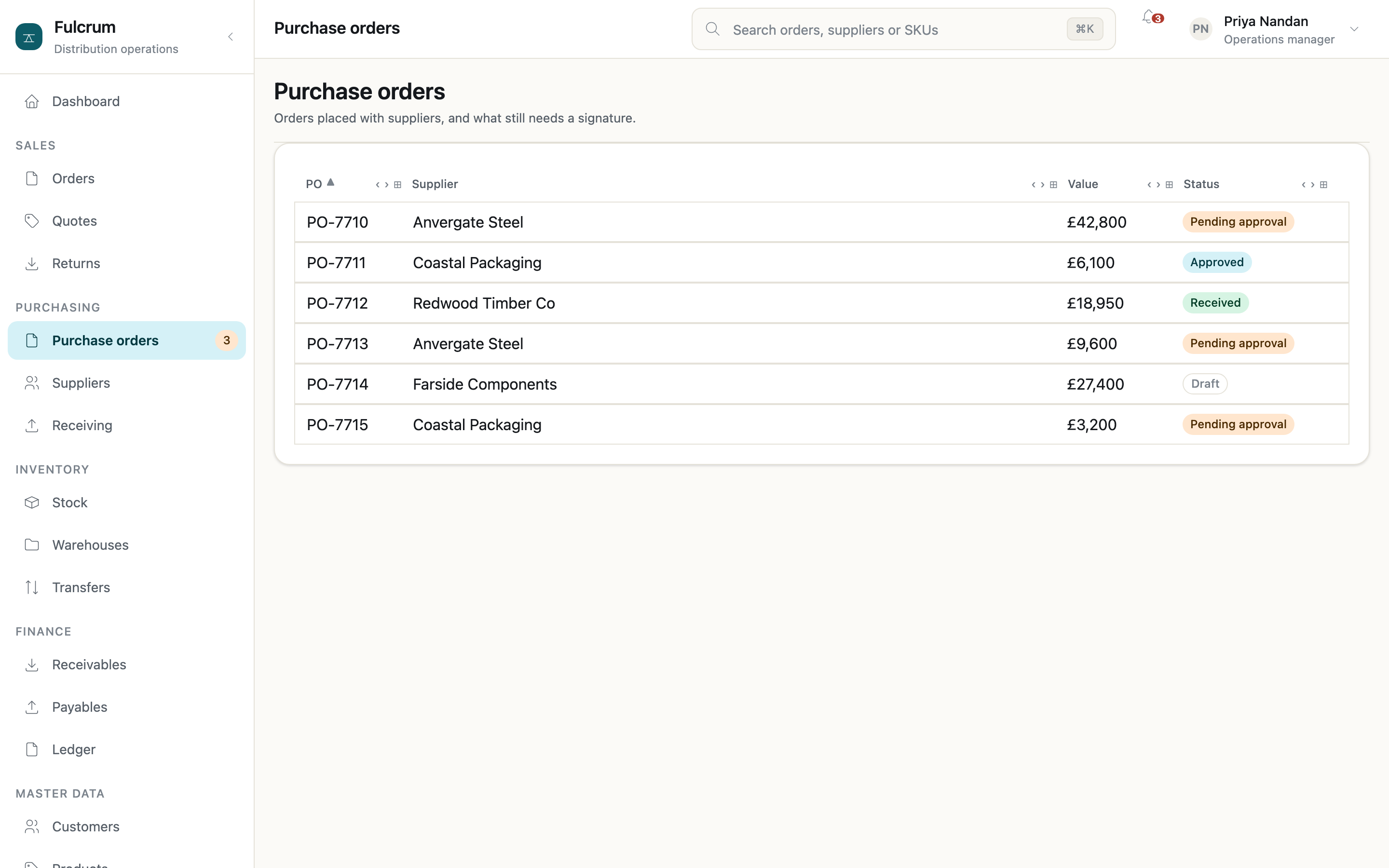
Persistent, hierarchical navigation for an app with many areas. SidebarShell →
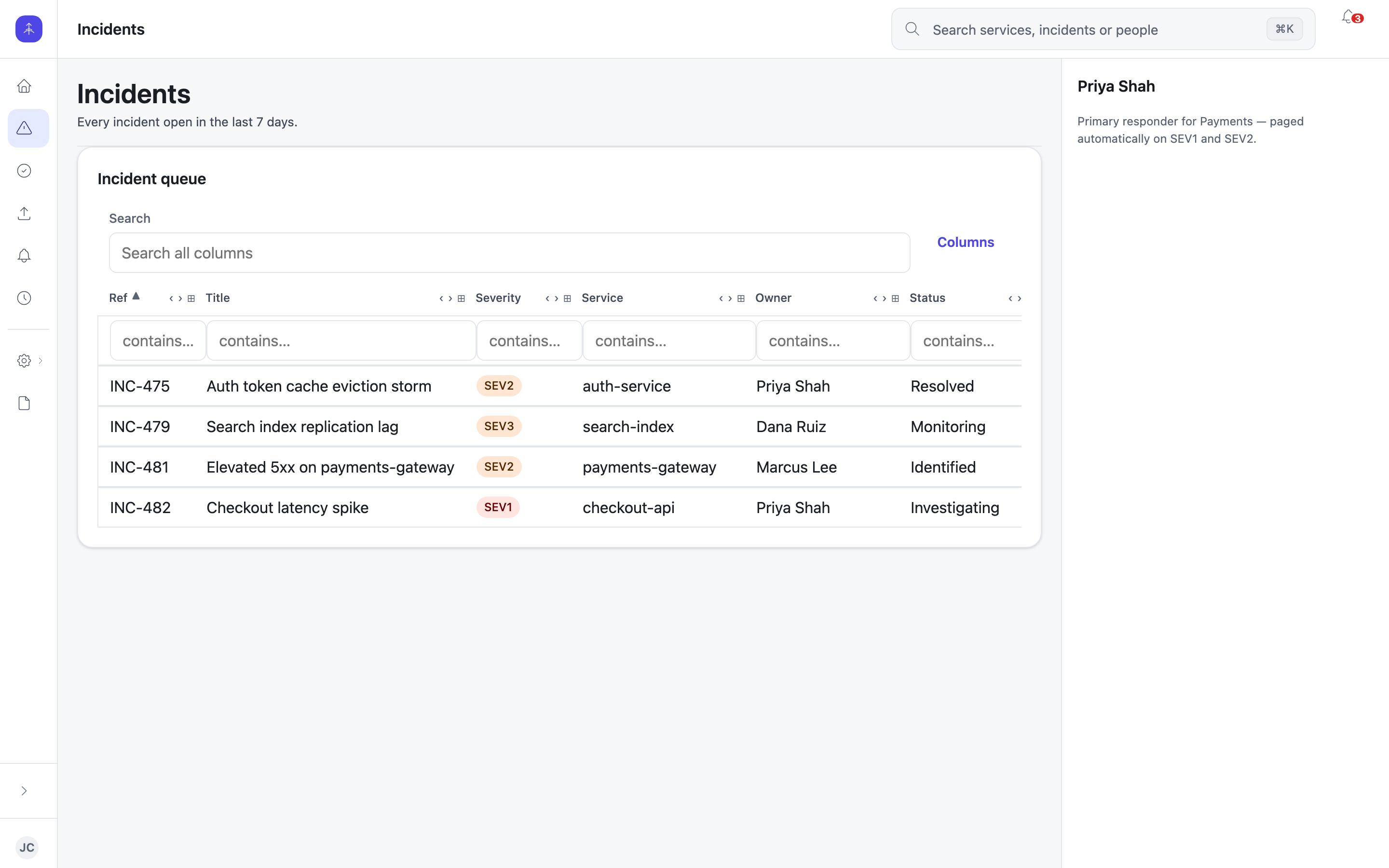
A narrow icon rail that gives the content every pixel it can. RailShell →
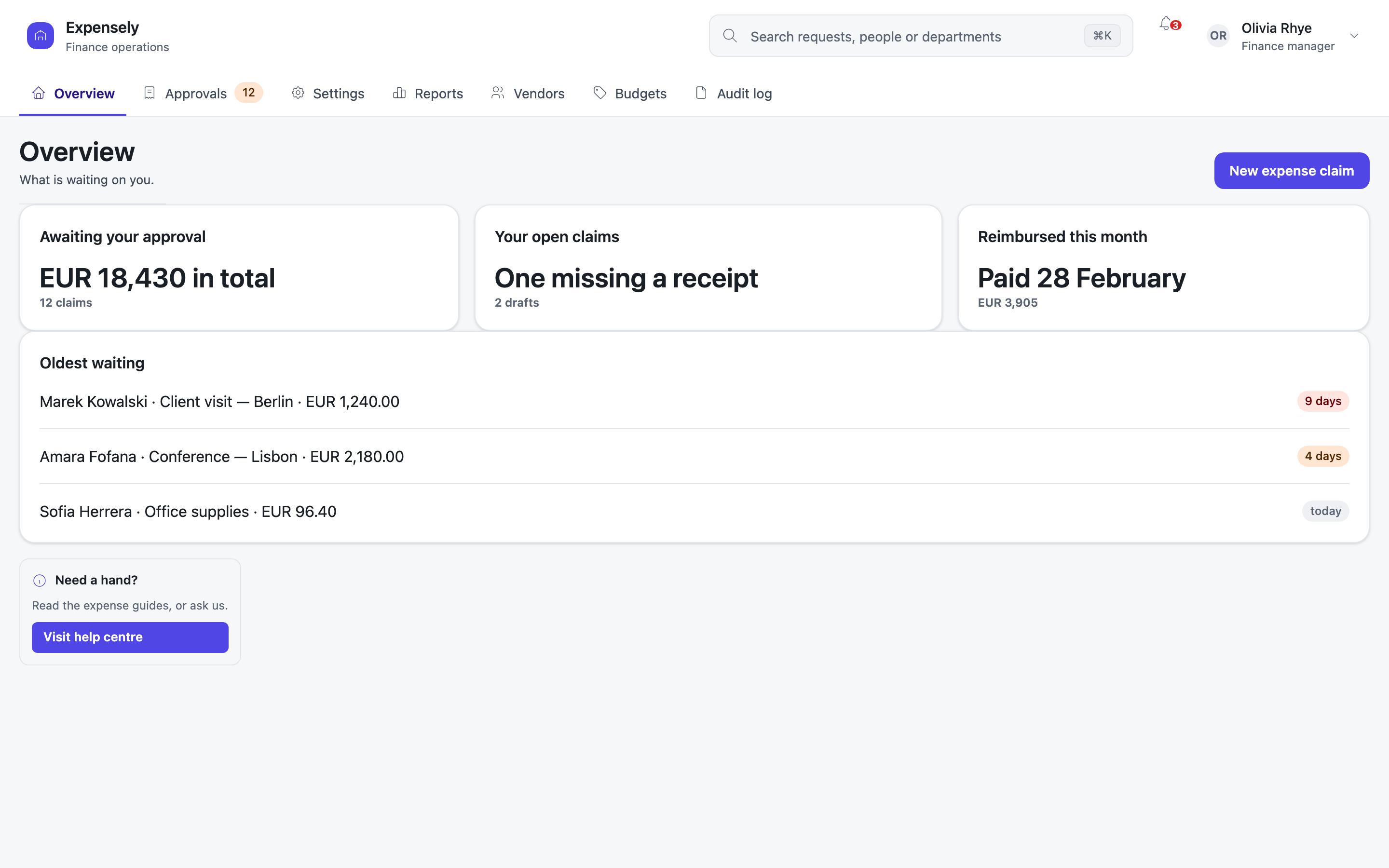
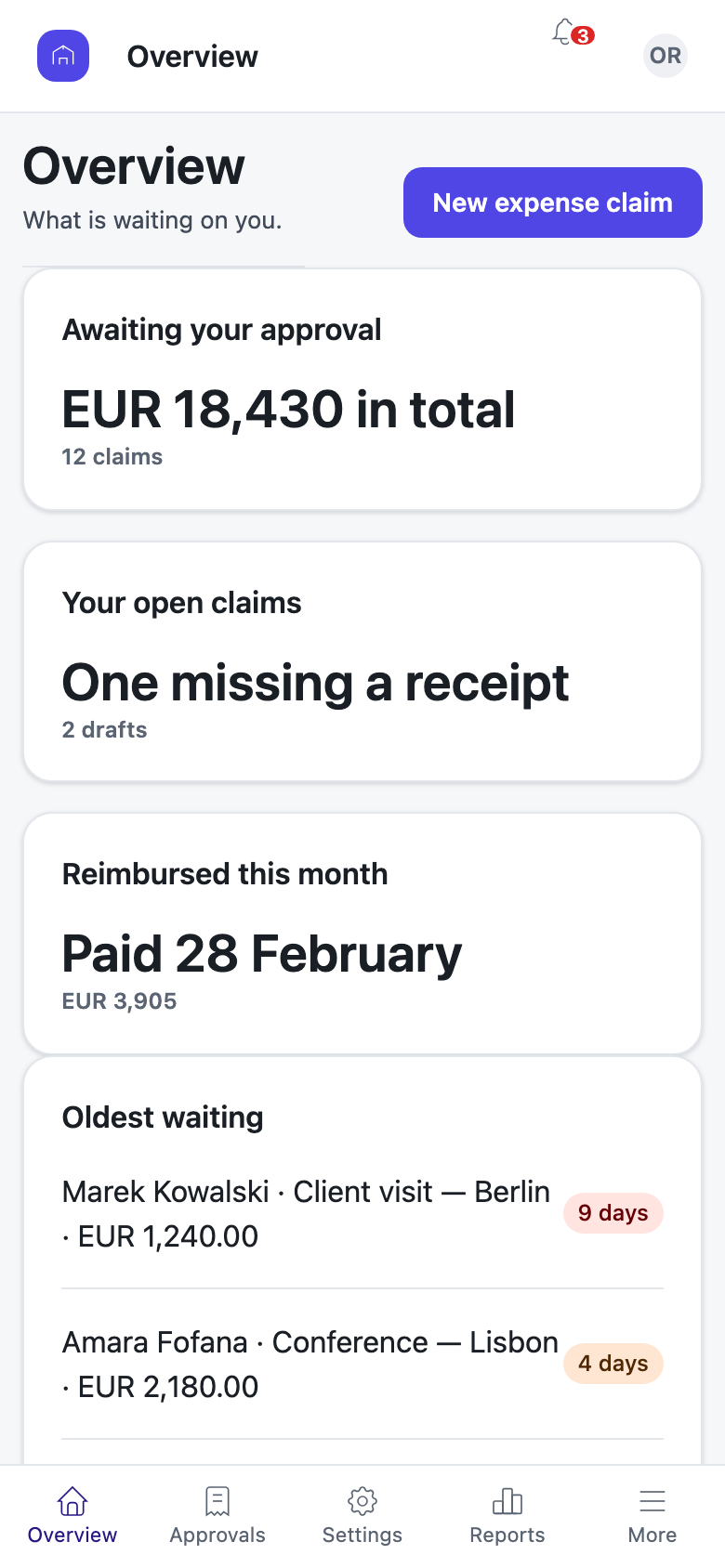
Tabs on a desktop and a bottom bar within thumb reach on a phone, from one navigation tree. TabbedShell →
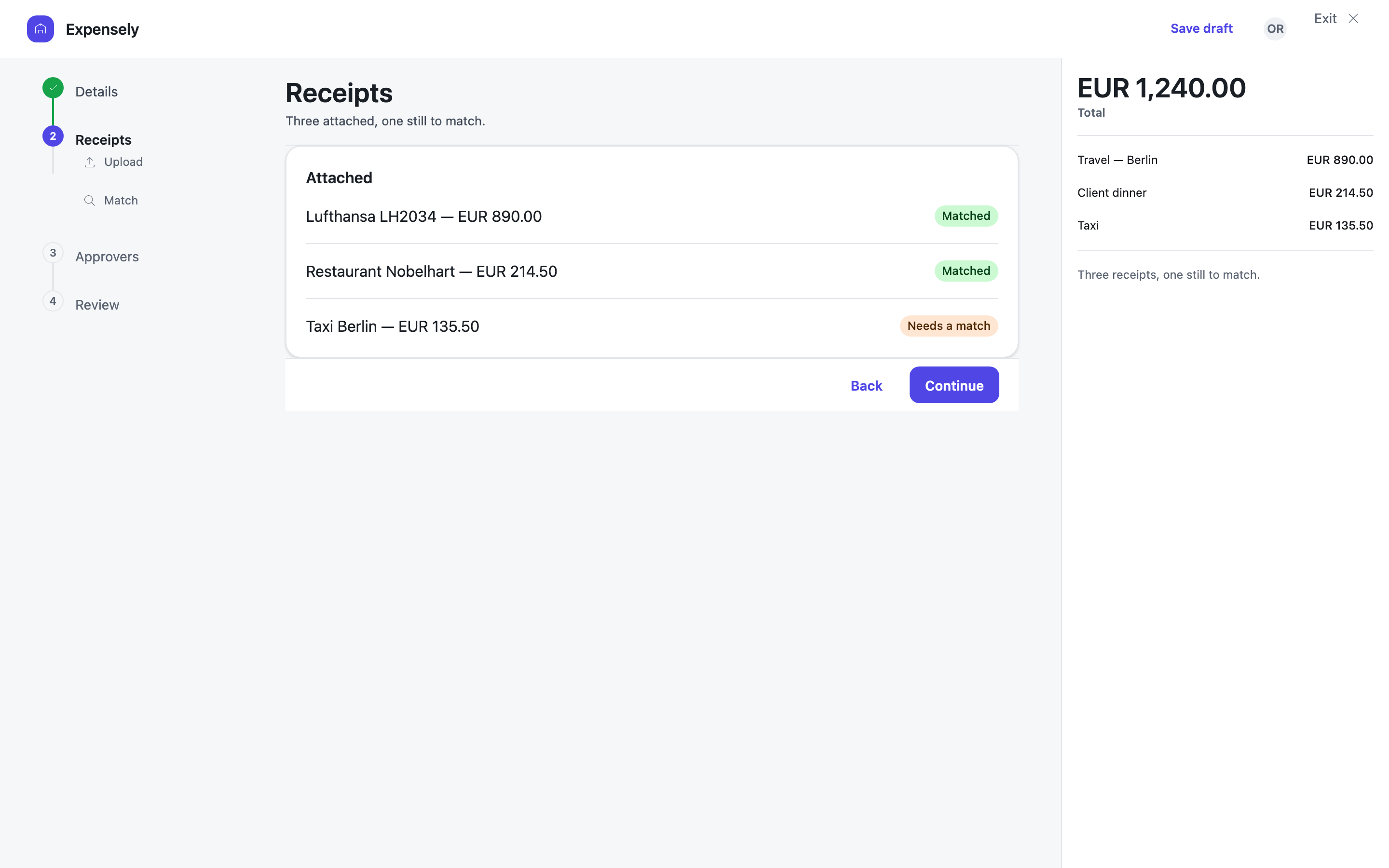
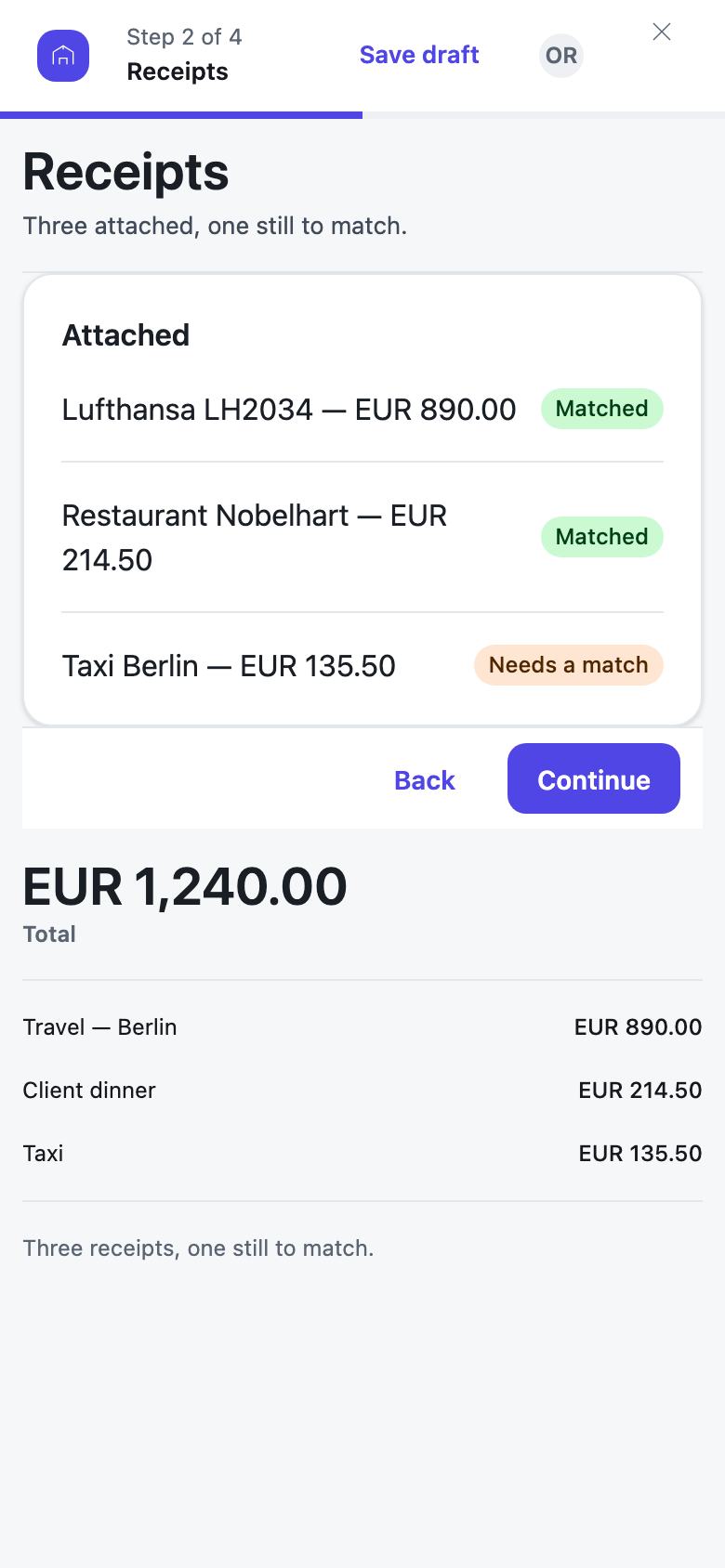
A clear primary action, your position in a sequence, and a way out. FocusedShell →
06
Four applications, one UI model
You can now read a component, a theme, a layout call, a branch on the width and a live expression. Here are a personal archive, a chat client, an arcade game and the platform's own control plane, built from that vocabulary and nothing else. Flip each one to see what drew it.
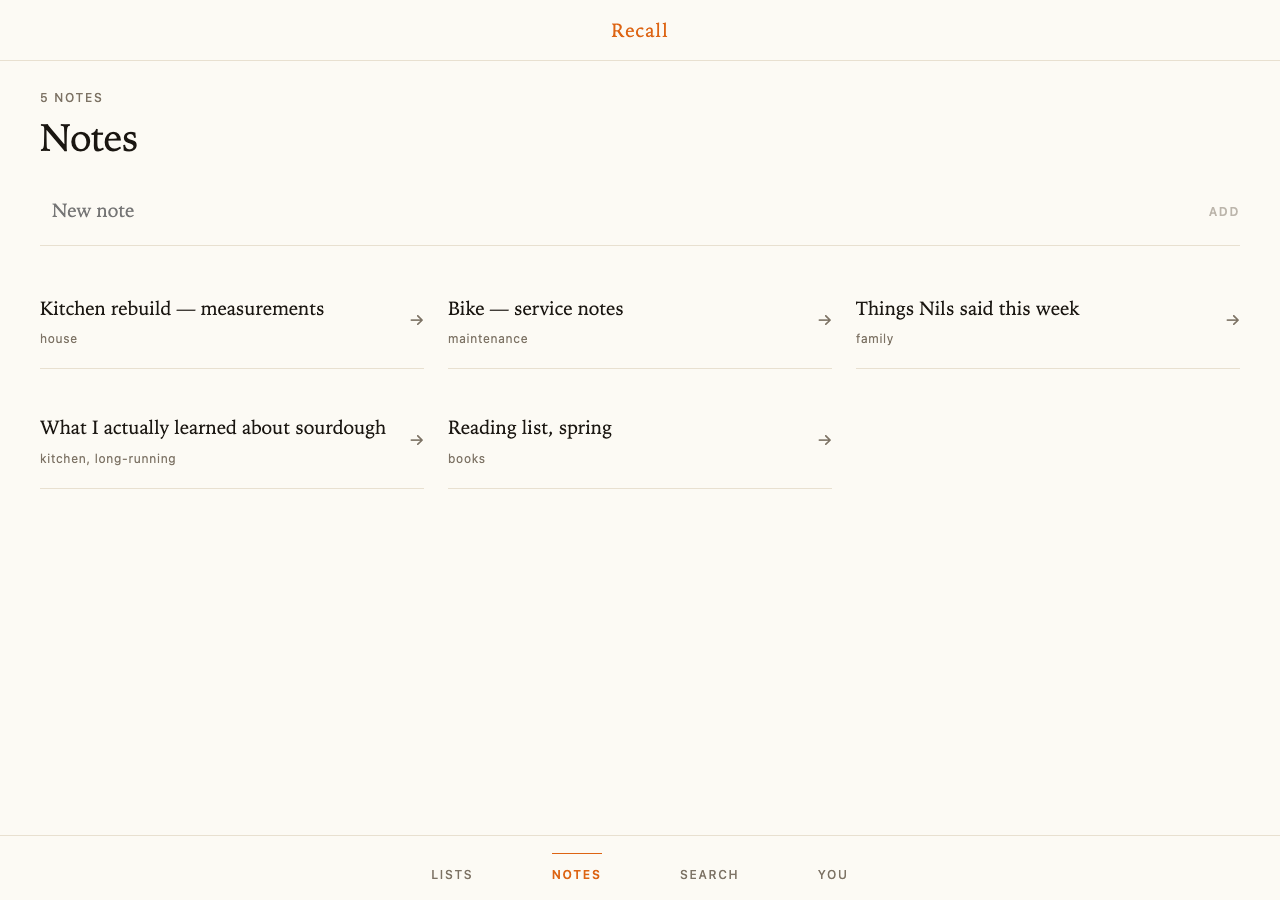
component NotesPage() {
  live var notes = Note.OrderByDescending(n => n.ModifiedAt).ToList();

  string draft = "";

  action Add() {
    if (draft == "") { return; }
    var created = CreateNote(draft);
    draft = "";
    Navigation.Go("/notes/" + created.Id);
  }

  render {
    Stack {
      ScreenHead(eyebrow: notes.Count == 1 ? "One note" : notes.Count + " notes", title: "Notes");
      Composer(value: draft, placeholder: "New note", onAdd: Add, disabled: draft == "");

      if (notes.Count == 0) {
        Blank(title: "Nothing written down yet",
              body: "A note is the fastest way to stop holding something in your head.");
      }

      CardGrid {
        foreach (var n in notes) {
          RuledRow(title: n.Title, sub: n.Tags == null ? "" : n.Tags, href: "/notes/" + n.Id);
        }
      }
    }
  }
Markdown field rendered by an atom, read-only here, because a note you are only reading should not pay for the editor.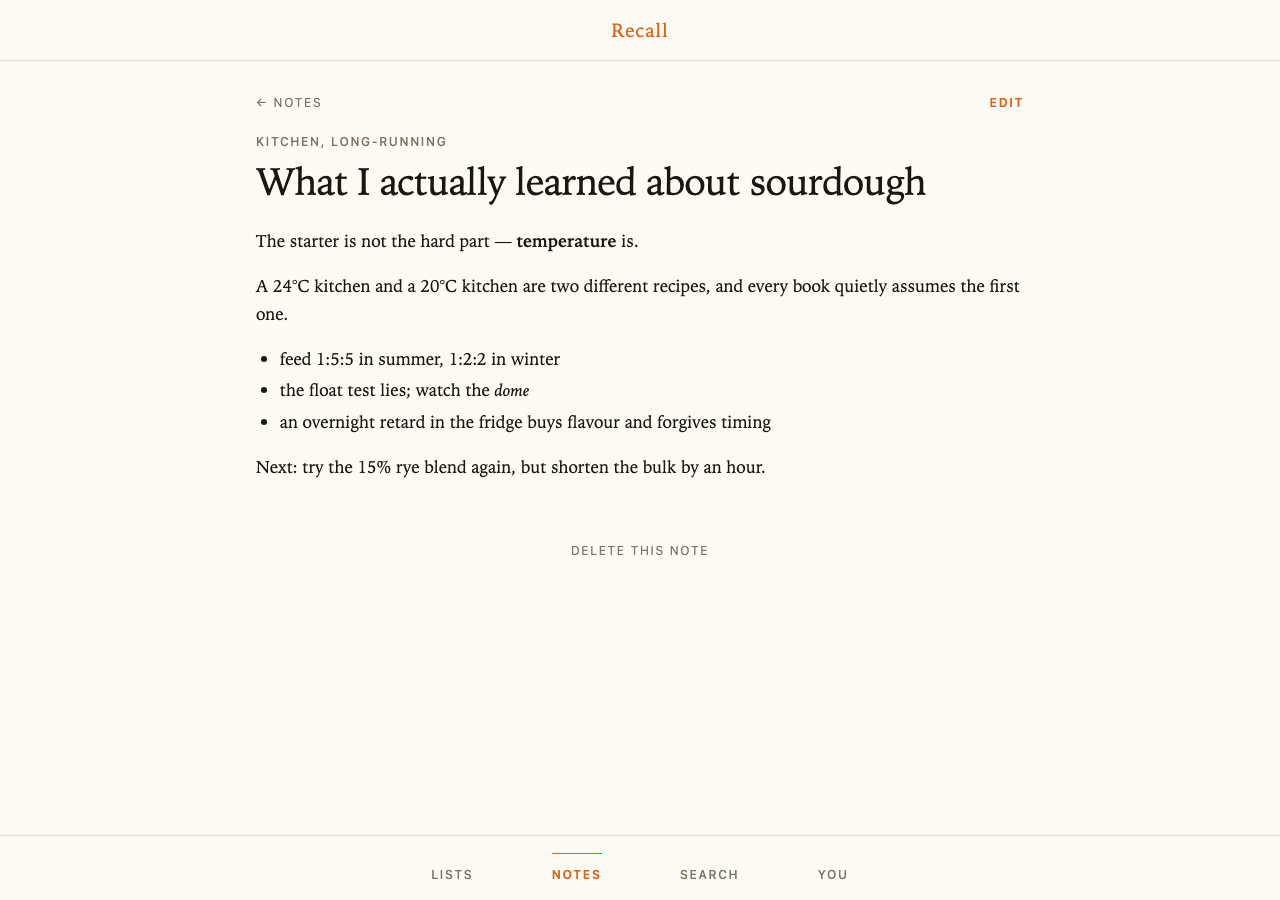
    Stack(maxW: Size.Read, mx: "auto", w: "100%") {
      Row(align: Align.Center, pb: 5) {
        Link(href: "/notes") {
          Text("←  Notes", fontFamily: Font.Sans, fontSize: FontSize.Label, letterSpacing: "0.14em",
               textTransform: TextTransform.Uppercase, color: Colors.TextMuted);
        }
        Spacer();
        if (note != null) {
          Link(href: "/notes/" + note.Id + "/edit") {
            Text("Edit", fontFamily: Font.Sans, fontSize: FontSize.Label, fontWeight: FontWeight.Semibold, letterSpacing: "0.14em",
                 textTransform: TextTransform.Uppercase, color: Colors.Primary);
          }
        }
      }

      if (note != null) {
        Stack(gap: 3, pb: 6) {
          if (note.Tags != null && note.Tags != "") { Eyebrow(text: note.Tags); }
          Text(note.Title, fontFamily: Font.Display, fontSize: FontSize.Title, color: Colors.OnBg,
               letterSpacing: "-0.015em", lineHeight: "1.05");
        }
        // The read-only renderer, set as prose: serif, long line height, on the paper rather than in a box. A note
        // you are only READING should not pay for a megabyte of editing machinery.
        Box(fontFamily: Font.Text, fontSize: FontSize.Body, color: Colors.OnBg, lineHeight: "1.7") {
          Markdown(note.Body);
        }
foreach over a query. The dark mode is the same theme: one token declaration with both values.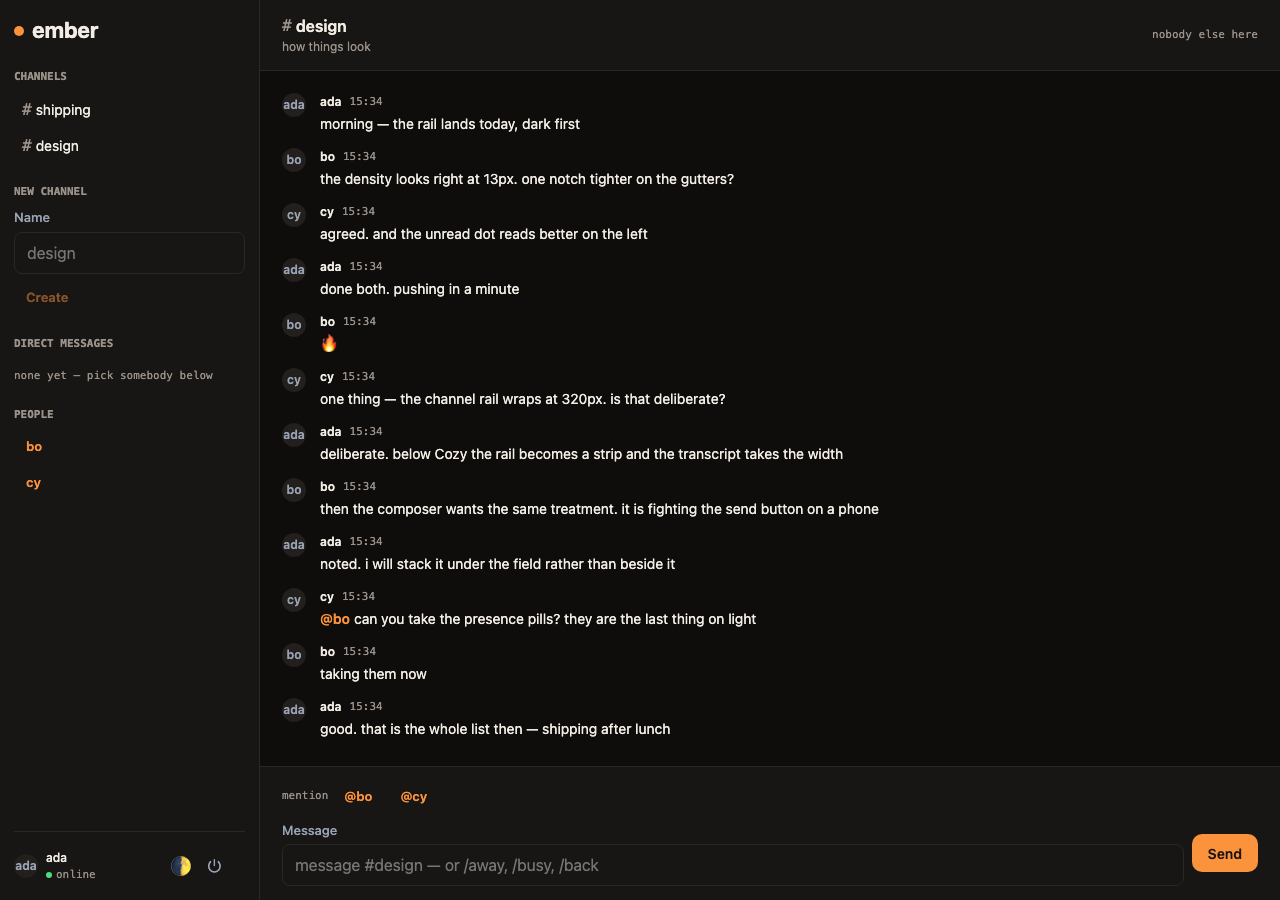
        foreach (var p in history) {
          Row(gap: Space.Beat, align: Align.Start) {
            Avatar(initials: p.Author.DisplayName, size: Size.Sm);
            Stack(gap: "2px", minW: "0") {
              Row(gap: Space.Step, align: Align.Center) {
                Text(p.Author.DisplayName, fontSize: FontSize.Caption, fontWeight: FontWeight.Semibold);
                Text(p.SentAt.ToString("HH:mm"), fontSize: FontSize.Micro, color: Colors.TextSecondary, fontFamily: Font.Mono);
              }
              MessageBody(body: p.Body, handles: handles);
            }
          }
        }

        foreach (var m in arriving) {
          Row(gap: Space.Beat, align: Align.Start) {
            Avatar(initials: m.Author, size: Size.Sm);
            Stack(gap: "2px", minW: "0") {
              Row(gap: Space.Step, align: Align.Center) {
                Text(m.Author, fontSize: FontSize.Caption, fontWeight: FontWeight.Semibold);
                Text(m.SentAt.ToString("HH:mm"), fontSize: FontSize.Micro, color: Colors.TextSecondary, fontFamily: Font.Mono);
              }
              MessageBody(body: m.Body, handles: handles);
            }
          }
        }
Canvas, a camera, a light and a few hundred Draw.Mesh calls a frame, in the same language. The whole loop runs in the browser, because that is where its work is.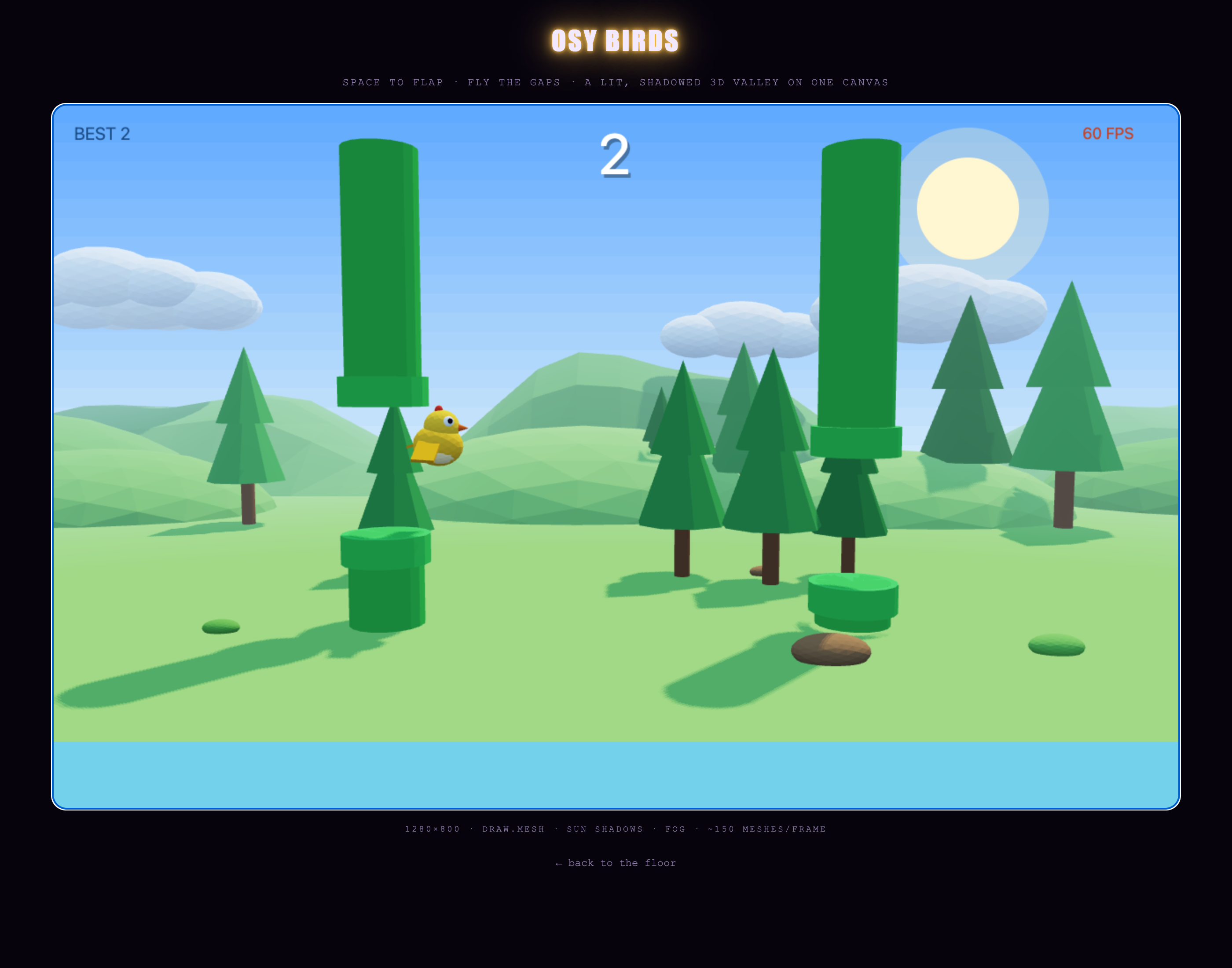
      // A pipe that slid off the left edge respawns at the back of the train — the list never grows.
      foreach (var p in pipes) {
        if (p.X < -11.0) {
          p.X = far + 9.0;
          far = p.X;
          p.GapY = 1.9 + (Roll() % 1000) / 1000.0 * 2.6;
          p.Scored = false;
        }
      }
    }
    valley.Advance(dt, speed);
    rooster.Advance(dt);

    if (state == 0) { birdY = 2.6 + Math.Sin(t * 2.2) * 0.16; }
    if (state == 2) {
      deadFor = deadFor + dt;
      vy = vy - 13.5 * dt;
      birdY = birdY + vy * dt;
      if (birdY < birdR + 0.04) { birdY = birdR + 0.04; vy = 0; }
    }

    // The camera breathes after the bird instead of being bolted to it.
    camY = camY + (2.4 + birdY * 0.25 - camY) * 5.0 * dt;

    sky.Paint();
    Draw.Camera(3.4, camY + 1.3, 17.5, 3.4, camY, 0, 42);
    Draw.Light(-0.35, -1.0, 0.45, "#ffeec2", "#bdd7f0");       // a late-afternoon sun, front-right and high
    Draw.Fog("#ffeccd", 13, 56);       // warm haze: the far ridge dissolves into the horizon rather than ending
    valley.Paint();
    DrawPipes();
    rooster.Paint(birdY, vy, state);
    DrawHud();
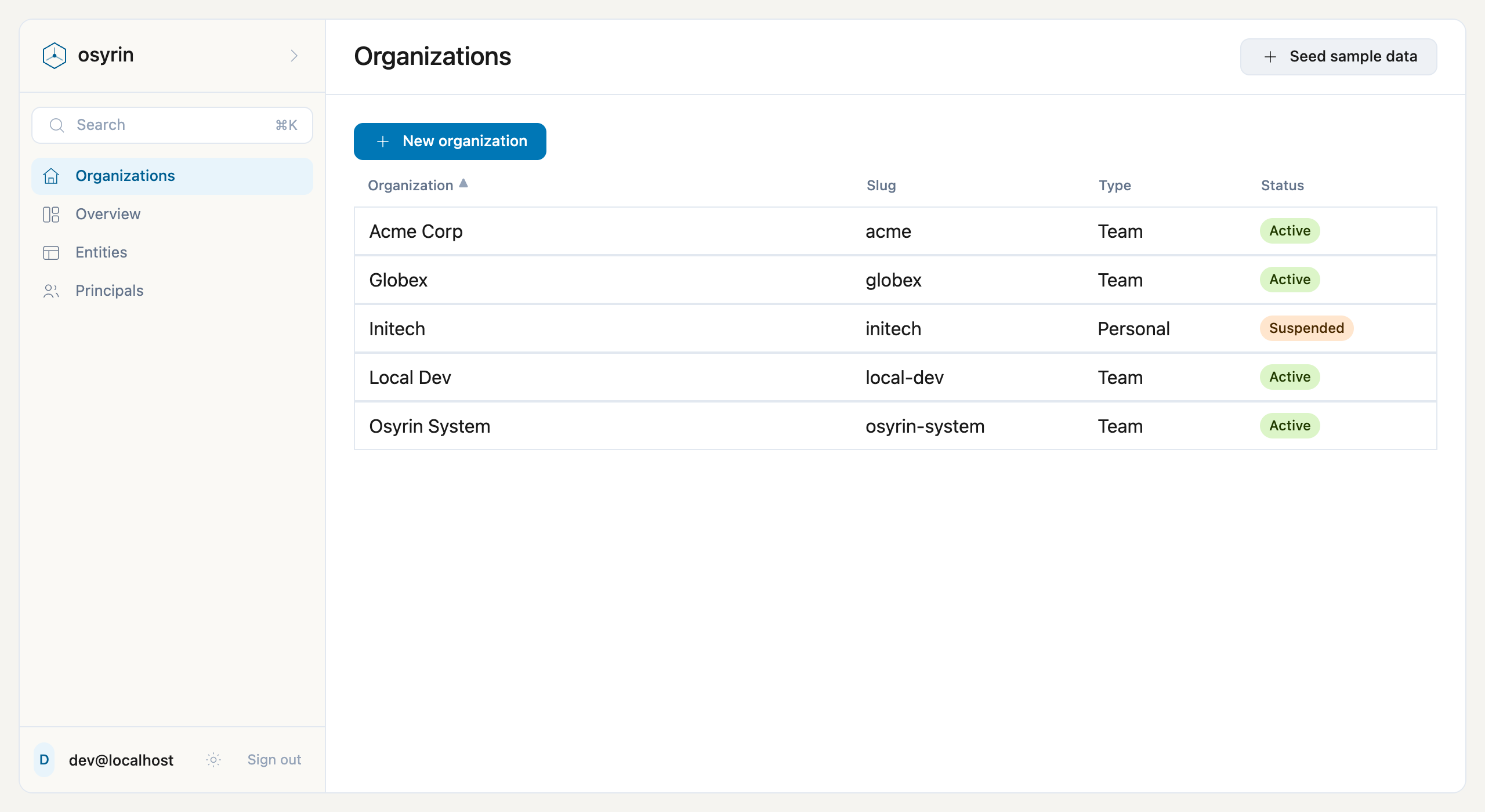
        DataGrid(
          label: "Organization list",
          rows: orgs,
          columns: [
            new GridColumn<Organization> { Name = "Name", Label = "Organization", Value = o => o.Name, Title = true, Fill = true },
            new GridColumn<Organization> { Name = "Slug", Label = "Slug", Value = o => o.Slug, Secondary = true },
            new GridColumn<Organization> { Name = "Type", Label = "Type", Value = o => o.Type.Label, Width = 140 },
            new GridColumn<Organization> { Name = "Status", Label = "Status", Value = o => HeldReasonOf(o.Id, deletions) != "" ? "Held" : o.Status.Label, Width = 220 },
            // Straight to the two places an organization is worked on (card org-sections-reachable: the owner looked for
            // Invite and could not find it — it is on the organization's Users page).
            new GridColumn<Organization> { Name = "Open", Label = "Go to", Value = o => "", Width = 200, Sortable = false }
          ],
          rowSelected: OpenOrg
        ) {
          // A CELL TEMPLATE (D78): the Status column renders the app's own Osy#, not the grid's text. The pill is the
          // kit's Badge — app code, forkable — and the TONE is a presentation decision about the status, so it lives
          // HERE, in the app's UI layer, never on the enum (metadata must not dictate UI). The label inside the pill
          // is the enum's own [Label], resolved because `o.Status` is a direct read of an enum-typed field.
          slot Open { o =>
            Row(gap: 3, align: Align.Center) {
              TextLink("Applications", to: "/org/" + o.Slug + "/applications");
              TextLink("Users", to: "/org/" + o.Slug + "/users");
            }
          }
          slot Status { o =>
            Stack(gap: 1) {
              // A HELD deletion first: the organization is untouched, and the reason is what an operator acts on.
              if (HeldReasonOf(o.Id, deletions) != "") {
                Row(align: Align.Center) { Badge(tone: Tone.Warning) { Text("Held"); } }
                Hint(HeldReasonOf(o.Id, deletions));
              }
              else if (o.Status == OrganizationStatus.Active) { Row(align: Align.Center) { Badge(tone: Tone.Success) { Text(o.Status); } } }
              else { Row(align: Align.Center) { Badge(tone: Tone.Warning) { Text(o.Status); } } }
            }
          }
        }
What happens when you change it
Change the program. The screen follows.
Each of these is a thing you would do on a Tuesday. The verdict is the compiler's, not a convention's.
| You do this | Verdict | Because |
|---|---|---|
| Change the type of a field the render reads | refused | Refused wherever it no longer fits. Every read of the field is checked, in the render block as in an action. |
| Change a token | compiles | Every use follows, in both modes. That is what a token is for. |
| Use a token the theme does not declare | refused | Refused, by name: a missing token is a compile error. |
| Move a breakpoint | compiles | It is a number in the theme, and the branch reads it. Nothing else changes. |
| Change a live query | compiles | The screen shows the new expression and stays tied to it: what it presents follows the rows the query now selects. |
| Rename an entity field a screen reads | refused | Refused at the read, named. The screen is part of the resolved program chapter 07 described. |