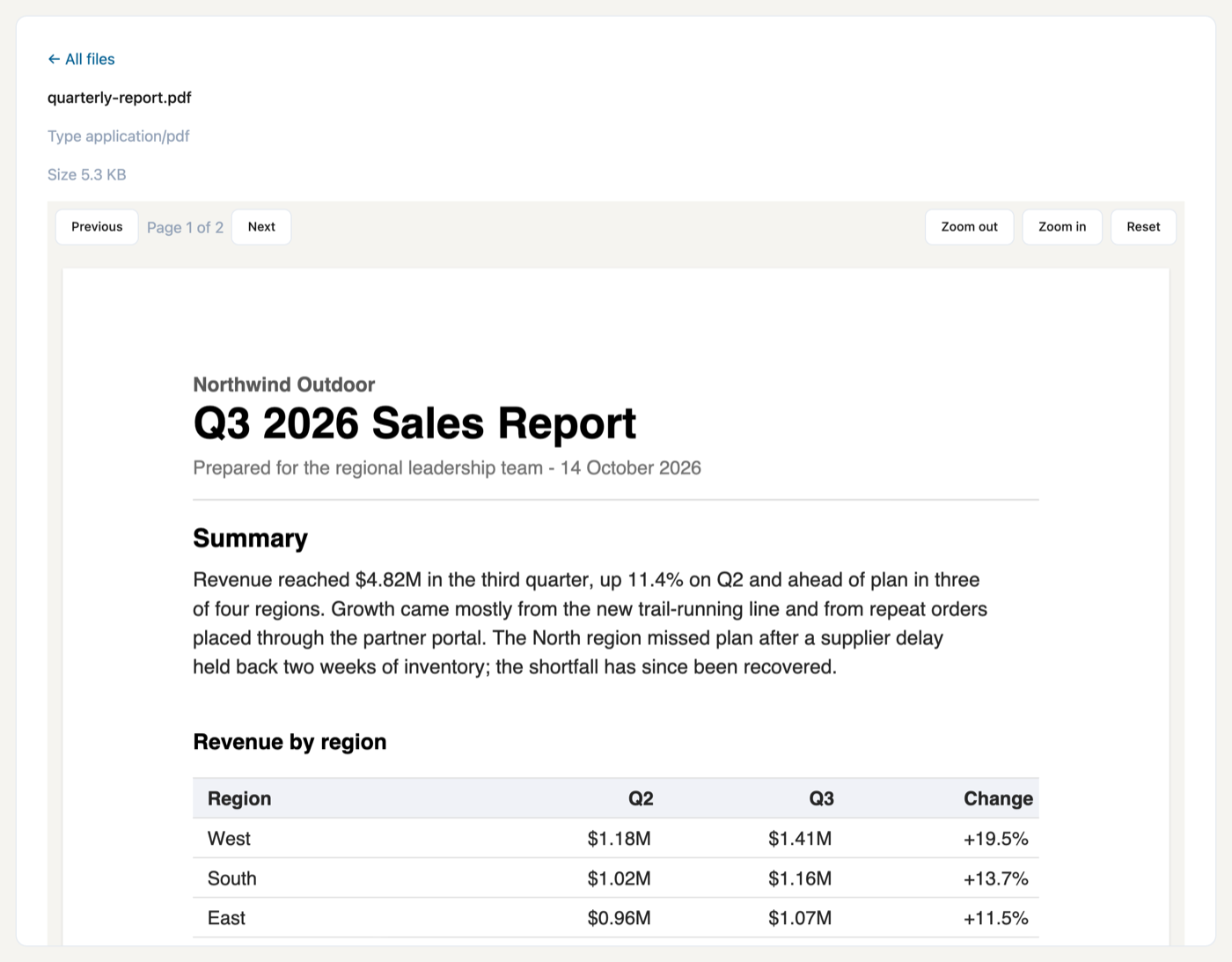
Two controls over a stored PDF: PdfViewer, a paged reader with fit, zoom and a real text layer, and PdfThumbnail, which draws one page as a picture for a list or a card. Rendering is pdf.js, in the browser.
Use case
Any app that keeps documents people need to look at without downloading them: contracts awaiting a signature, invoices in an approval queue, reports shared with a team, scanned forms attached to a case. Upload the file as a FileAsset and show it on the page it belongs to — the text stays selectable and readable by a screen reader, scanned pages render too, and a file list can show each document's first page instead of a generic icon.
Install
osy
// app.osy
app Contracts {
  use Osysharp.Pdf@1;
  model "model/**/*.osy";
}
console
osy lock # resolves the package and pins its content address in osyrin.lock
Using it
osy
using Osysharp.Pdf;

[Route("/documents/{id}")]
component DocumentPage(Guid id) {
  int shown = 1;
  int pages = 0;
  action Loaded(int count) { pages = count; }
  action Moved(int page) { shown = page; }

  render {
    PdfViewer(fileAsset: id, page: shown, fit: "width", loaded: Loaded, pageChanged: Moved) {
      slot Toolbar { v =>
        Row(gap: 1) {
          Button("Previous", onClick: v.PreviousPage);
          Text("Page " + shown + " of " + pages);
          Button("Next", onClick: v.NextPage);
        }
      }
    }
  }
}
The document is read through the app's own file access: the viewer asks for a signed address to the asset under the viewer's own permissions, so a person who may not read the file cannot open it here either.
PdfViewer prop | default | what it does |
|---|---|---|
fileAsset | — | the stored PDF to show |
page | 1 | the page in view |
fit | "width" | width, page or actual |
zoom | 100 | percent, on top of the fit |
layout | "continuous" | continuous scrolls through every page; single shows one |
It raises loaded(pageCount), pageChanged(page) and failed(reason), and takes the commands NextPage, PreviousPage, ZoomIn, ZoomOut and ResetZoom — which is how the Toolbar slot above drives it.
PdfThumbnail(fileAsset: id, page: 1, width: 128) draws one page as a picture and raises loaded and failed. Both controls share the same chunks, so a list of thumbnails and the reader download pdf.js once.
Build your own on top
Make the reader yours without forking. The toolbar is your markup in the Toolbar slot, so paging, zoom, a download button or a "sign this document" action are ordinary app code next to the viewer. A component of yours can wrap the pair — a DocumentPreview that shows a thumbnail and opens the reader — and your pages use that.
Fork it. Fork this repository into your own GitHub account or organisation and rename the package to match — package Acme.Pdf lives at github.com/acme/pdf, because a package's owner is its GitHub owner. The controls are a TypeScript shim over pdf.js, built with the ordinary CLI:
console
npm install
npm run chunks          # rebuild pdfjs-core.js, pdfjs-worker.js, fonts/ and wasm/ from the installed pdf.js
osy control build .     # regenerate the typed ABI, type-check the shim against it, bundle it, re-pin osyrin.lock
osy publish             # check the package and create the release
pdf.control.check.ts is generated from the declaration so tsc proves the shim uses only the public control ABI — the same one your own controls get.
⚠ cmaps/ is deliberately not built. It is 1.6 MB of CJK encoding tables, needed only by a document with CJK text in a non-Unicode encoding. A fork that needs it adds one entry in scripts/build-chunks.mjs and one in the chunks { } block.
What is in the source
| file | what it is |
|---|---|
pdf.osy | the control PdfViewer declaration — the kit's whole public surface |
pdf.ts | the shim source: chunk loading, signing, page layout, canvas + text layer |
pdf.js | the bundled shim, checked in — what a consumer's browser loads |
pdfjs-core.js / pdfjs-worker.js | the Core and Worker chunks. ⚠ named pdfjs-* and not pdf.js, which is the SHIM's name — copying the library in under its upstream name would overwrite the shim with the library, and the kit would still build and pin |
fonts/ | the Fonts package chunk — the base-14 substitutes, for a document that embeds none |
wasm/ | the Wasm package chunk — JBIG2 / JPEG 2000 decoders. Not optional in practice: a scan renders BLANK without them, because pdfjs falls back silently |
licenses/ | the upstream licence texts. Shipped with the source rather than served to a browser |
osyrin.lock | the package's pins — the bundle and its chunks by content address |
pdf.control.d.ts / .check.ts | GENERATED by osy control build — the ABI, and the line that holds the shim to it |
Licence
MIT — see LICENSE. The .osy source is yours to read, copy, fork and ship.
pdf.js is Apache-2.0. It, the fonts and the decoders the kit ships keep their own terms; those texts are in licenses/ and LICENSE names each one.
Get it
Add the kit to your app’s manifest:
osy
app MyApp {
  use Osysharp.Pdf@1;
}
Then run osy lock: it downloads the release, verifies it by its content address and pins that version in osyrin.lock. osy kits Osysharp.Pdf shows what the kit is for, from inside your app.
Source: github.com/osysharp/pdf.
Reference: osy docs ui-pdf-kit.