Line, area, column, bar, scatter and OHLC candle charts over one shared value scale, plus pie and donut — drawn from your app's own data, with no JavaScript and no bundle to ship.
Use case
Dashboards and reports inside an Osy# app: revenue against target on a sales overview, a sparkline in a table row, the share of orders by channel, a price history on a trading screen. You pass the numbers you already query. Because every chart is ordinary Osy# components rather than a canvas, it renders on the server's first paint, is readable by keyboard and screen reader without extra work, follows your app's theme in light and dark, and can show the same data as a real table beside it or in its place.
Install
osy
// app.osy
app Dashboard {
  use Osysharp.Charts@1;
  model "model/**/*.osy";
}
console
osy lock # resolves the package and pins its content address in osyrin.lock
Using it
osy
using Osysharp.Charts;

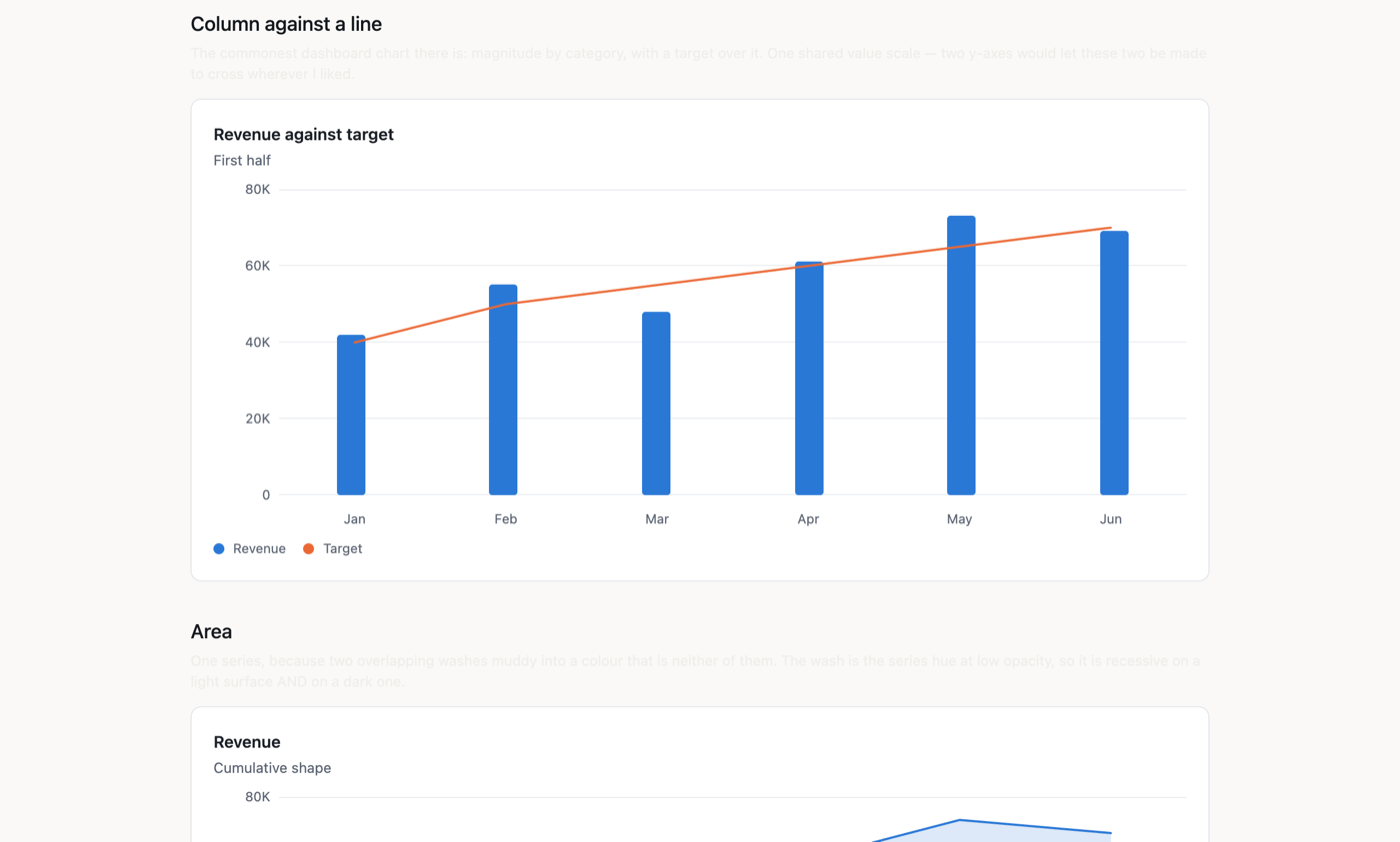
Chart(title: "Revenue against target", subtitle: "First half", labels: months) {
  Column(label: "Revenue", values: revenue);
  Line(label: "Target", values: target);
  Axis(side: Left);
}
The marks are written as CHILDREN — they are config records, so the call site reads as the picture being described rather than as an array being assembled. Giving the chart labels is what asks for a category axis; you rarely declare Axis(side: Bottom).
A bare enum member is the spelling here (side: Left), exactly as in any other component call — AxisSide.Left also works and is what you would write in C#.
What it does
| marks | line, area, column and horizontal bar (GROUPED when there is more than one series, or stacked: true), scatter, OHLC candle — and Pie/donut as a sibling component |
| axes | a value axis with round-number ticks, a category axis, optional gridlines, a title, an explicit min/max, a value format and prefix/suffix |
| signed values | a negative value grows from the zero line, downwards on a column chart and leftwards on a bar; the axis opens below zero to make room, and a mixed-sign stack splits at the line |
| hover | a crosshair and a readout naming every series' value in the hovered category |
| legend | automatic for two or more series, swatch + name; position: on any edge or None, interactive: true to toggle a series off |
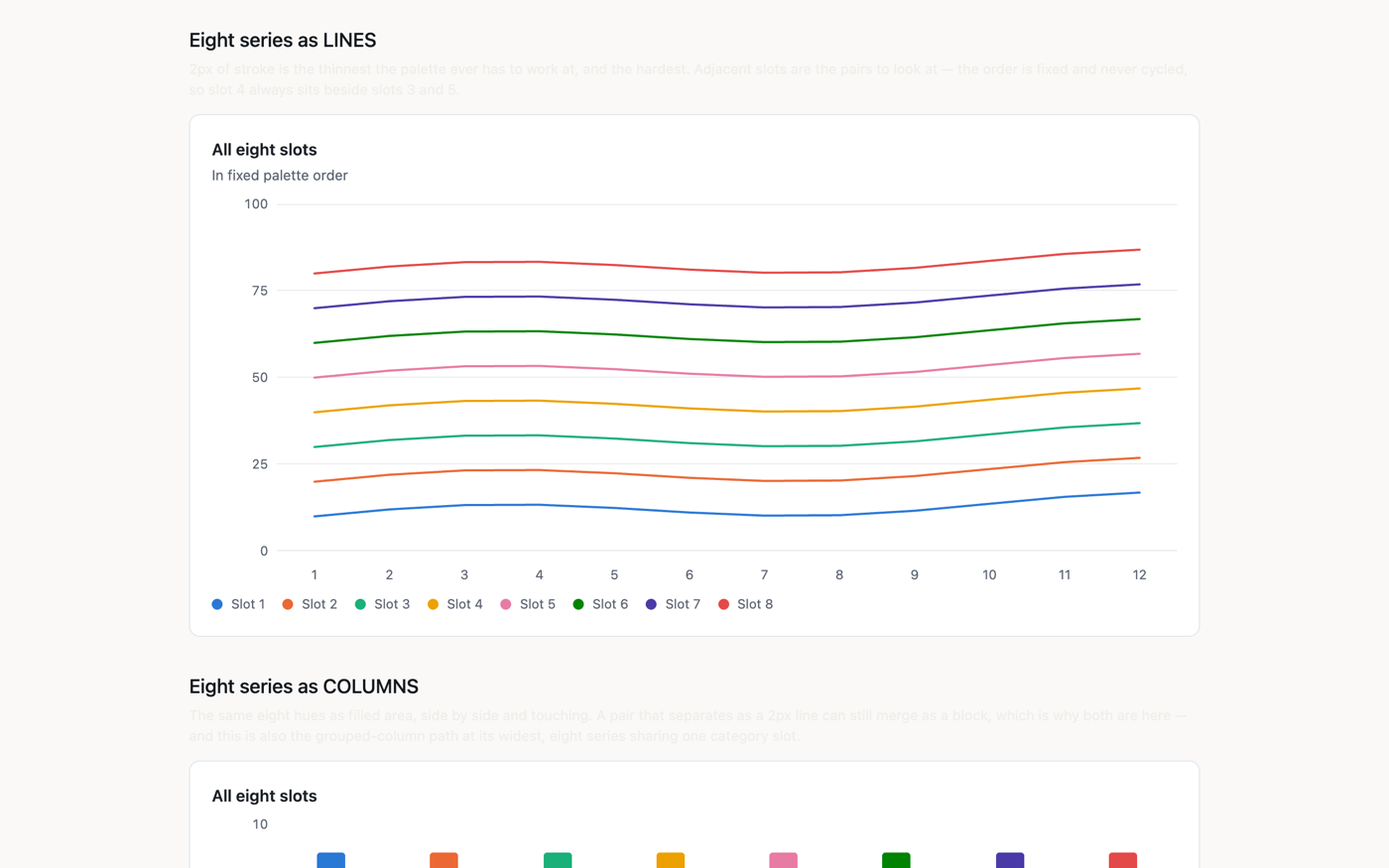
| palette | eight validated hues in fixed order, never cycled |
| annotations | a reference Rule, a shaded Band, a labelled Note — none of them a series |
| table | Table() below the chart, or Table(position: Instead) in place of it — a real grid |
| bare mode | chrome: Bare — the sparkline: no card, axes, gridlines, legend, heading or hover |
| states | an empty state; a chart with one series draws no legend |
The hover readout
One invisible band of full-height cells sits over the plot, one per category. Hovering a cell reveals a crosshair and a readout of every series at that category — the shared-crosshair behaviour a line chart wants, which happens to be right for columns and dots too. One rule for every mark kind, so what you learn on a bar chart holds on a line chart.
It is still no JavaScript: inside HoverCell.Hover { Opacity = 1; } is an ancestor-conditioned variant that lowers to a descendant CSS rule. No pointer handler, no coordinates, no measurement. On a <canvas> this is hit-testing against pixel coordinates, which is most of a charting library.
And it stays inside the plot. Centred on its cell, a readout at the first or last category would hang past the edge and be clipped — losing exactly the label you hovered to read. It measures instead: the plot's width comes from the hover band (whose root spans the plot), the readout's own from Layout.TextWidth over the lines it is about to paint, and the difference becomes a shift that is zero everywhere except the cells that would overflow. A middle category is still centred on its crosshair, which is what makes this a flip rather than a re-anchor.
⚑ Measured from the TEXT, not from the box. Asking Layout.Width for the readout's own width from inside the readout lags its content by construction (109.0 against a painted 114.6), because the number describes one layout pass and the content may be from another. Layout.TextWidth is a pure function of the string and the font, so there is nothing to lag. The cost is that ReadoutWidth must mirror ReadoutBody's lines — change one, change the other.
Annotations — a Rule, a Band, a Note
Things that are true about the chart but are not in the data: a target, an acceptable range, the day something happened. Written as children, like a mark or an axis:
osy
Chart(title: "Revenue against target", labels: months) {
  Column(label: "Revenue", values: revenue);
  Band(from: 55000.0, to: 65000.0, label: "Acceptable");
  Rule(value: 60000.0, label: "Target");
  Note(category: "May", value: 73000.0, label: "v2 launch");
  Axis(side: Left);
}
⚑ AN ANNOTATION IS NOT A SERIES, and that is the whole design. No legend entry, no palette slot (it has its own ink), it cannot be toggled off, and it does not move the scale — because none of those things is true of "the target is 60k". Modelling a target as a flat one-value Line is the usual shortcut and it costs exactly those four: the legend grows an entry nobody clicks, the palette shifts under the real series, and a 500k target stretches the axis until every real bar is a stub in the bottom eighth.
Out-of-range annotations are therefore clamped, and say so both ways: ↑ on the face of the chart and "(above the top of this chart)" in the accessible name. A clamped line that looked exactly like a met target would be its own kind of lie.
⚑ A Note caption picks its own side, measured. Right of its dot unless it would not fit there — decided with Layout.TextWidth against the plot's real width, because "fits" is a fact about this string at this size, not about the category index: "v2 launch" and "Q3 reforecast complete" need different room at the same position.
⚠ A Note names its category by NAME, and a name that is not there is said out loud. An index would be a lie waiting to happen (insert a month at the front and every note silently shifts one slot). Categories are runtime data, so a wrong name cannot be a compile error — and a note that simply vanished would leave a chart that renders perfectly and is missing what you asked for. It renders ⚠ note "Summer push" names a category this chart does not have: "Jul" instead, in the same spirit as "No data to plot".
The table view — Table()
The same data as rows, below the chart or instead of it:
osy
Chart(title: "Revenue and refunds", labels: months) {
  Column(label: "Revenue", values: revenue);
  Line(label: "Refunds", values: refunds);
  Axis(side: Left, format: "N0", prefix: "£");
  Table();                          // …or Table(position: Instead)
}
⚑ IT IS THE ACCESSIBILITY ANSWER, and a better one than more aria-labels. Every mark already names itself ("Revenue: £42,000") — exactly right when a reader is ON that mark, and useless for the questions they actually have: which month was highest? what were the other five? Those are answered by STRUCTURE, so the table is a real role: Grid / GridRow / ColumnHeader / GridCell, which a screen reader reads by position and announces with its column header, and which a sighted reader can select and copy.
⚑ Instead is a first-class answer, not a fallback for a broken chart. Plenty of data is a table wearing a picture: five magnitudes that do not trend, anything a reader will want to copy out. It removes the marks and the legend — a legend there would be a key to colours nothing on screen is using.
⚠ The cells go through the same Formatted(value, axis) as the tick labels, and the columns are titled with the series' own Label. A second formatting path is a table that quietly disagrees with the picture above it. For the same reason it follows the legend: hide a series and its column leaves.
A candle's column says (close), because Values IS the close and one column per series is what keeps the header row and the body rows in lockstep. A series shorter than the labels gets an em dash — zero is a value and would be read as one.
Sparklines — chrome: Bare
Everything that is not a mark, taken away — no card, no axes, no gridlines, no legend, no heading, no hover readout:
osy
Box(w: 220, h: 30) {
  Chart(title: "Revenue", labels: months, height: 30, chrome: ChartChrome.Bare) {
    Line(label: "Revenue", values: revenue);
  }
}
⚑ A MODE, NOT A SECOND COMPONENT. A sparkline is not a different kind of picture — it is this one stripped. A separate Sparkline would be a second path through the same marks, and the two would drift the first time either changed.
⚠ A TITLE IS NOT DROPPED, IT MOVES. title: with chrome: Bare draws no heading and becomes the chart's accessible name. A sparkline still has to announce what it is, and silently discarding something the author declared is the failure this kit refuses everywhere else. Nothing is lost; it changes channel.
The hover band goes too. It is invisible by construction, so it would never show up in a screenshot — and it is a full-size hit target laid over an inline element, which is a real nuisance in a table row.
The legend is a control — and it is where the no-JavaScript claim gets tested
Chart(title: "Revenue and refunds", labels: months) {
  Column(label: "Revenue", values: revenue);
  Line(label: "Refunds", values: refunds);
  Legend(position: Right, interactive: true);
}
position is Top | Bottom | Left | Right | None — None rather than a separate show flag, because two ways to say "no legend" is two states that can disagree.
interactive: true makes each entry a real <button>: click a series to switch it off, click again to bring it back. Everything else here is presentation (hover is an ancestor-conditioned variant; the marks are laid out by flexbox), so this is the first feature that needs state surviving a click — and the author still writes no JavaScript. It is component state and an action, the same mechanism a form field uses.
Two things follow the toggle and one deliberately does not:
- the scale follows. Switch off the tallest series and the axis rescales, so the survivors fill the plot instead of hugging the floor of a scale set by something no longer on screen.
- the readout follows. A hidden series is not in the hover tooltip either.
- the colours do NOT. A series keeps its palette slot whether it is showing or not, so hiding series 2 does not repaint 3 through 8 under a reader who had learned what orange meant.
Off by default: an affordance that looks live must be live, and a legend that responds to a click on a chart printed into a report is a lie its reader has no way to detect.
Share of a whole: Pie, and why it is not a Kind
Pie(title: "Revenue by channel", hole: 0.55, format: "N0", prefix: "£", centre: "£412K") {
  Slice(label: "Direct", value: 184000.0);
  Slice(label: "Partner", value: 121000.0);
  Slice(label: "Self-serve", value: 76000.0, explode: true);
}
A sibling component rather than another mark, because everything Chart shares between its marks is wrong for a pie: no value axis, no category axis, no gridlines, and a scale that is share-of-total rather than a domain with a lo and a top. hole: 0.0 is a pie and hole: 0.55 a donut — one picture with a hole of a different size.
It needs nothing beyond the Path atom: Path takes points/fill/closed and buildPathD closes with Z, so a slice is an ordinary closed polygon at ~3° a segment and a donut slice is the outer arc forward plus the inner arc reversed. Exploding one is a single added vector along its own bisector. The one mechanical difference from every other mark: no stretch — a stretched path sets preserveAspectRatio="none", which turns a circle into an ellipse, so the geometry is computed in the pixel size the pie is drawn at.
A pie is the weakest chart there is for comparing values, and that is a reason to know what it is for rather than to omit it: people compare angles badly and lengths well, so Column wins "which is biggest" every time. What a pie says better than any bar chart is these are the parts of one thing. The legend carries each slice's value and its share, because reading either off the angles is exactly what a reader cannot do.
How it is built
- Every mark is an element or a
Path. A column is aBox; hover, focus, click andaria-labelcome from the DOM, so a keyboard user can traverse a bar chart with nothing written for them. That is most of what makes a canvas charting library large, and none of it is re-implemented here. - Two column series GROUP — they share each category slot, divided by
grow: 1rather than arithmetic. They used to overlay, which does not read as "overlapping": it reads as a stacked bar, with the apparent total being the taller series and the shorter one invisible wherever it lost. - Lines and areas need no measurement. They are drawn in a nominal 1000-unit space with
Path(stretch: true), so the browser maps the viewBox onto whatever box the plot gets. A resize costs no re-render and no observer, and the geometry is right on the server's first paint. - The palette is computed, not chosen. Eight hues validated for CVD separation, a lightness band, a chroma floor and surface contrast in BOTH modes, assigned in fixed order and never cycled. Each is a
Palette.Fromramp, so a series has a hover step and a wash as well as its base colour. - One value scale, always. Two y-axes on one chart is the single most misleading thing a charting library offers; two measures of different magnitude belong in two charts.
- A bar's baseline is zero, not the data's minimum. That one is not configurable —
Axis(min:)can extend the axis BELOW zero but never lift it above, because a bar is read by its length from zero and cropping that changes what it says. A negative value is drawn from the same line, in the other direction: the scale opens down to the data's minimum, the zero line lands on a gridline, and a stack with values either side of zero splits there. (A candle is the exception that proves it — its axis is free to zoom, because a price between 118 and 137 drawn from zero is a band in the top eighth.) - One
ChartCtxcarries the resolved chart.Chartworks out the scale, the ticks, the orientation and which strips to draw, packs them into one value, and hands that down. It is a parameter OBJECT and not an ambient on purpose: the parameter is the visible statement of what each piece depends on. Mark.Kindis an enum, andIsBarKindhas no_arm. Every question about a mark's kind funnels through that one switch expression, so a sixth kind fails the build at the site that must decide about it. WhileKindwere a string, adding a kind would be a search, and a missed site would draw wrong silently.- …and yet
CandleMark : Markis a SUBTYPE, which is not a contradiction — it is two different questions.Kindanswers how does this draw, and an enum is right for it: aColumnand aBarhold identical data and differ only in which way the chart is turned, so subtypes there would be five near-empty classes replacing a vocabulary that already checks itself. A subtype answers what data does this carry, and exactly one mark needs it — a candle has four numbers per category where every other mark has one, so the places that want a high or a low ask by type (marks.OfType<CandleMark>()), and nothing else knows candles exist. ⚑Valuesstays the CLOSE, which is why the scale, the legend, the hover readout and a moving-averageLinedrawn over the sessions all keep working unchanged. AndMarkKind.Candlesurvives as the one member nothing compares against: its job is to keep a candle from matching any style pass — delete it and aCandleMarkfalls back to the inheritedLinedefault, and the line pass quietly draws a curve through the closes.
Build your own on top
Wrap it. A chart is a component call, so your own component can fix the choices you make every time — a RevenueCard that always draws revenue as columns against a target line, in your currency and format — and your pages call that. Nothing about the package changes, and you keep receiving its updates.
Ship a package that uses it. A package can depend on this one, and its consumers get it automatically:
osy
package Acme.Dashboards {
  version "1.0.0";
  model   "model/**/*.osy";
  use Osysharp.Charts@1;
}
Fork it. Fork this repository into your own GitHub account or organisation, and rename the package to match — package Acme.Charts lives at github.com/acme/charts, because a package's owner is its GitHub owner. Change what you need, then run osy publish: it checks that the package compiles and the tree is clean and pushed, and creates the release. Apps switch with use Acme.Charts@1;.
To work on your fork next to an app before publishing, list its directory in an osy.workspace file at your repository root; a use of it then resolves to your local copy instead of a release.
It is pure Osy# — there is nothing to build. A fork is edited and published as it is.
What is in the source
| file | what it is |
|---|---|
theme.osy | the kit's opening argument, and its design tokens — the eight validated series hues, the chart's own surface/ink/grid, the readout's palette, type sizes, motion and layer |
vocabularies.osy | the shapes an author fills (Mark, CandleMark, AxisDef, Annotation, LegendDef, TableDef) and the config records a call site writes (Line/Area/Column/Bar/Scatter/Candle/Axis/Legend/Table/Rule/Band/Note) |
scale.osy | the arithmetic — the shared value scale, round-number ticks, tick labels, palette slots, and the point lists a Path is drawn from |
Chart.osy | the Chart component itself, plus the value and category axes |
Plot.osy | the plot area — gridlines, every drawn mark (columns, bars, candles, dots, lines, areas, stacks) and the annotation layers |
Hover.osy | the hover band: the crosshair and the readout |
Legend.osy | the legend, and the hidden-series set a toggle flips |
Pie.osy | the Pie/donut sibling component and its slice geometry |
Table.osy | the same data as a real role: Grid — below the chart or instead of it |
Licence
MIT — see LICENSE. Every .osy file here is yours to read, copy, fork and ship.
This kit vendors nothing: 2,548 lines of Osy# and not one line of JavaScript. A charting library is the surface people are most certain needs a JS dependency, and it does not.
Get it
Add the kit to your app’s manifest:
osy
app MyApp {
  use Osysharp.Charts@1;
}
Then run osy lock: it downloads the release, verifies it by its content address and pins that version in osyrin.lock. osy kits Osysharp.Charts shows what the kit is for, from inside your app.
Source: github.com/osysharp/charts.
Reference: osy docs ui-chart-kit.